

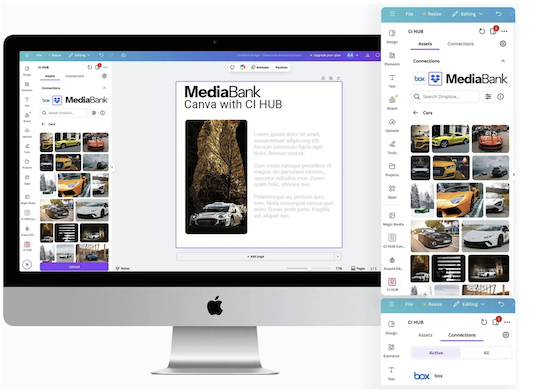
Browsing in Canva Made Easy
Browse and access your DAM MediaBank - all within Canva, all at the same time in one plugin. Give your team instant access to all your creative content and assets. With the CI-HUB Canva integration, you can effortlessly access your MediaBank assets directly from your favorite application. Search, edit, and save your assets back to MediaBank , all within the tool you already use.
Accessing your DAM from Canva should not be a pain
Canva is the perfect tool to bring creative inspiration to life in minutes. But if you’re used to working with your assets stored in a DAM, accessing them in Canva is a pain.
Tired of breaking your flow in Canva to hunt down files in your MediaBank, download them, then re-upload before you can even start?
Not with the MediaBank CI-HUB connector!
With the MediaBank CI-HUB Connector, you can pull the assets you need straight into Canva! No switching tabs, no extra steps, just seamless creativity. This simple connector lets you grab your assets from MediaBank, then drag and drop them straight into your design, without ever leaving Canva.
With the Canva integration, you can effortlessly access your MediaBank assets directly from your favorite application. Search, edit, and save your assets back to MediaBank , all within the tool you already use.

No More Manual Uploads
No need to locally download your assets from your DAM or cloud storage solution before using them in Canva. Streamline your workflow by accessing them instantly.
Drag and Drop
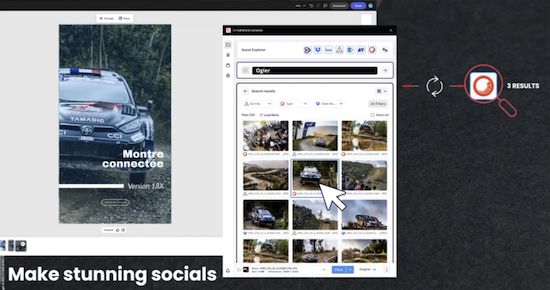
Browse your DAM library directly inside Canva, simply drag and drop images, icons and graphics assets into your designs, and publish without downloading or switching platforms.
Content in Context with Metadata
The CI-HUB connector shows all asset metadata directly within Canva, so that designers have the context they need to use assets correctly. DAM access for Canva makes it easier than ever to use metadata, navigate to assets, and connect to your DAM system directly from within Canva.
Users can now see all custom metadata stored in their DAM for each asset. In addition, metadata text such as product descriptions, captions, or copyright attributions can be dragged and dropped directly into a Canva design.
How it helps:
- Faster design creation using existing metadata.
- Improved compliance with copyright and attribution requirements.
- Consistent messaging when metadata contains brand language or product details.
Secure
CI HUB ensures secure workflows compliance with all data privacy regulations, keeping your files safe and protected.
The Canva integration enhances your creation process by enabling teams to easily search and insert on-brand assets from your MediaBank library directly within the Canva platform.
Adobe Creative Cloud / Adobe Express
The MediaBank connector works also with Adobe integrations, you can effortlessly access your MediaBank assets directly from your favorite applications. Search, edit, and save your assets back to MediaBank, all within the tools you already use. Your users will have direct access to the approved files in your MediaBank without having to leave their Adobe Applications. No more switching between applications and wondering if you are still using the latest version of an image in your InDesign projects.
We simplify your use and distribution of content
No matter the size of your DAM (Digital Asset Management) service, it has incredible power in a simple interface configured to your needs. What we at Communication Pro do with MediaBank DAM is to make it accessible to all and easy for groups to capture, organize and share all the information that matters.

Learn why the choice of a partner instead of just a vendor is crucial: Choose a Partner, not just a Vendor
To learn more about how MediaBank and Canva works seamlessly together and everything else we have to offer, check out our webpage here or book an online meeting here.
 |
Author Rolf Koppatz Rolf is the CEO and consultant at Communication Pro with long experience in DAMs, Managing Visual Files, Marketing Portals, Content Hubs and Computer Vision. Contact me at LinkedIn. |